🛡️ Introducing 1.1.1.1 For Families
Digital safety is a fast-moving target, and it can be hard to keep up. While no single tool is 100% foolproof, there is a powerful, free service that provides an essential first line of defense for your children’s devices.
Cloudflare (one of the world’s largest internet security companies) offers a free service called 1.1.1.1 for Families. It helps keep students safe by filtering your internet connection at the source to block harmful content before it even reaches the screen.
Adult Content Filtering: Automatically blocks adult websites.
Automatic Malware Protection: Blocks “phishing” sites and harmful code that tries to steal your family’s private information.
Speed & Privacy: It’s one of the fastest services available and doesn’t track or sell your browsing data.
Think of DNS (Domain Name System) as the “Phonebook of the Internet.”
When you type a website name into your browser, your device has to look it up in a digital phonebook to find that site’s “phone number” (its IP address). By using Cloudflare for Families, you are giving your device a “Smart Phonebook”.
If a child tries to visit a site known for adult content or malware, the phonebook simply refuses to provide the number.
The browser displays an error or a blank page instead of the harmful content.
Because this happens at the “request” level, it works across different apps and browsers.
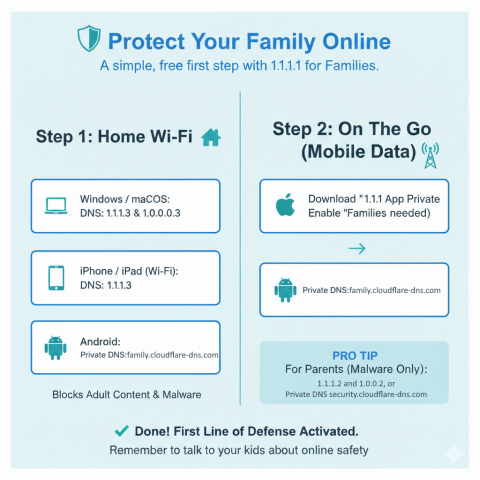
You can protect individual devices by following these steps. We recommend the “Adult + Malware” settings for all student devices.
Go to Control Panel > Network and Sharing Centre > Change adapter options
Right-click your connection > Properties > IPv4
Use “1.1.1.3” and “1.0.0.3”.
Go to System Settings > Network > Advanced > DNS
Add the 1.1.1.3/1.0.0.3 IPs.
Go to Settings > Network & internet > Private DNS
Set it to family.cloudflare-dns.com
For these devices the App is Required, download the 1.1.1.1 app from the Play Store and enable “Families” mode in the app settings.
While Cloudflare offers a “1.1.1.1” app, we recommend using the Security Profile (https://l.stmichaels.school/884G6H) for student devices. Here’s why:
Follow the setup steps above but use these addresses instead: 1.1.1.2 and 1.0.0.2, or the Private DNS security.cloudflare-dns.com on Android.
While this DNS filter is a powerful “first line of defence,” it’s like a high-quality padlock on a door—it makes the house much safer, but it’s still important to check in on what’s happening inside. We recommend using this alongside regular conversations with your children about their online world.
Come and see for yourself
Book a personal visit or register for one of our open days
Visit our school so you can see for yourselves the class sizes, the dedication and commitment of our staff, the range of facilities and resources available to enhance your child’s learning, meet our pupils and confidently make the right decision for your child.

“Just a note to say thank you to St Michael's for our son's 8 years at the school. He's enjoyed every second of it and has fully embraced all the opportunities the school has to offer. I'm sure his time at the school will stand him in excellent stead for secondary school. As an additional mention, I wanted to let you know how wonderful Mrs Matthews has been for our daughter in Year 4. We've always felt that the teaching has been very good at the school but Mrs Matthews seems to be on a whole other level! Her communication, feedback and encouragement has been excellent. She has clearly spent time really getting to understand the children and our daughter's confidence and ability has come on in leaps and bounds. We cannot thank her enough! ”
- Former Parent
“After a lengthy search in West Oxfordshire at numerous other private schools, I found none of them were a patch on St Michael's. They had huge grounds, impressive sporting and drama facilities, however the special family/nurturing feel we've always loved about St Michael's just wasn't there at all. I decided that if we couldn't find a school which measured up to St Michael's, then there was little point in moving, so we stopped the house move and are remaining where we are.”
- Parent
“During my time at St Michael's, not only did I really enjoy it, I found that I wasn’t scared to move on and I felt prepared and ready for senior school. I now realise just how much the school gave me and at Senior School, I have found topics that I had already covered or had been hinted to in the lessons at St Michael’s. So I really thank the school and feel grateful for the preparation that I had and now use. ”
- Former Pupil
“As a former pupil, St. Michael's was the obvious choice. Their values and school ethos have remained the same and Sophia has become a confident, caring and hardworking individual. ”
- Former Parent and Pupil
“Just wanted to say a big Thank You to all staff and teachers over the last few months. As a full time working Mum I don't know what I would have done without the structure provided each day.”
- Parent
“..thriving, secure, ‘family feel’ environment where children are positively nurtured as individuals and able to reach their own potential.”
- Parent
“St. Michael's is a wonderful school. I would recommend it to anyone looking for a safe haven for their child to grow, learn to be well rounded individuals with the love of God in their hearts and love for all human beings as well as develop academically putting them in a good position ready for the next level of education.”
- Former Parent
“St Michael's has been on our radar for the last few years following on from various positive conversations with different people about the school, your results and the general atmosphere and approach. With our daughter now turning two, we felt it was a good time to start enquiring and visiting the school. We're so glad we did!”
- Prospective Parent